

How Do I Submit My Packet for Review?
Submitting your packet on time is an important step in the review process. Be sure to submit all packet sections by the due date. Submit all sections by the due date to ensure your full packet is reviewed. A section can only be submitted once all required items in that section have been completed. As soon as you submit the first section of your packet, your case will move to the first workflow step, and the assigned review committee will receive an automatic email notifying them that materials are ready for review.
- Submit one section: Click the blue Submit button inside that section.
-
Submit all sections at once: Check the checkbox at the top of the screen to select all sections, then click Submit Sections.
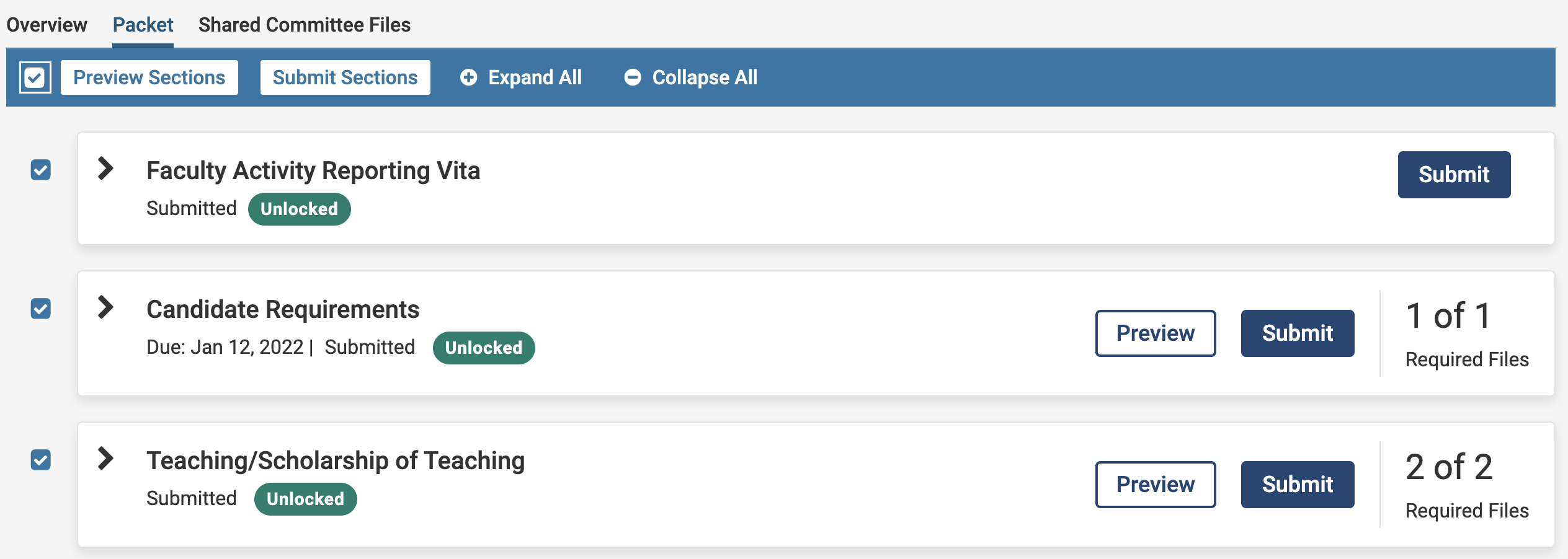
Important: once you submit a section, it locks immediately. Only your institution’s administrator can unlock it. If you need to make changes after submitting, contact your Case Manager or Unit Administrator.
Hard deadlines: if your packet has one, all materials are automatically submitted and locked at the due date, even if some requirements are incomplete. You’ll receive reminder emails 7 days and 1 day before the deadline.
After Submission: What to Expect
- No confirmation email is sent when all sections are submitted. Instead, your packet’s status updates to “Submitted” in your account. This status serves as confirmation that your materials were successfully submitted for review.
- As soon as you submit the first section, your case moves to the first workflow step and the assigned committee receives an email that materials are ready for review.
- The committee can begin reviewing even while you’re still completing other sections.
- After full submission, you cannot download or print your RPT packet. Access to materials depends on your institution’s policies.
During review, your institution may share files with you and, if enabled, request a response. You’ll receive an email when files are shared. If a response is requested, it will also appear in My Tasks with a due date. Check out our article on how to View and Respond to Files Shared by a Committee (Rebuttal) for instructions.