

Retrieve Missing Letter Requests
If a letter request is expected but does not appear, search for the request using the request ID number.
Retrieve Missing Letter Requests
- Look for the document ID number in the email notifying the request.
- Click Letters on the navigation menu.
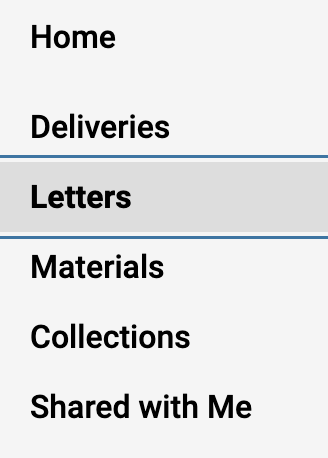
- Select the Letters to Write tab.
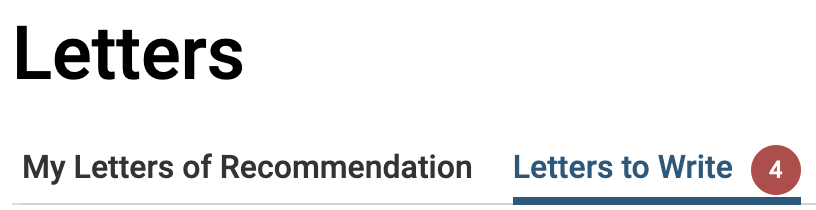
Note that the number of new requests will appear listed on the tab and the letters asked to write will appear listed on the page. By default, requests that have not yet been accepted, or that have been accepted but not yet submitted will appear listed.
- Scroll to the bottom and click Enter It to enter the ID number of the missing request.

- Enter the ten digit Request ID number in the field.
- Click Search.
- Click Claim to retrieve the request or View Details to download the document or replace it with a new one.
- Click to download PDF, download the original, or replace the file.
Still unable to find a request?
This article provides troubleshooting solutions when a letter writer is not receiving the letter request. Letter writers always have the option of emailing their confidential letter to help@interfolio.com (have them include your name and email address). Interfolio will upload the letter on their behalf.
How to troubleshoot when your letter writer has not received your letter request
- Ask the letter writer to check their spam or junk folder. The email request will come from help@interfolio.com with the subject line 'Confidential Letter of Recommendation or Evaluation Request From [Requester's Name].'
-
Confirm the letter writer's email address. Sign in to your Dossier account, select your name in the top right-hand corner and select 'My Contacts.'
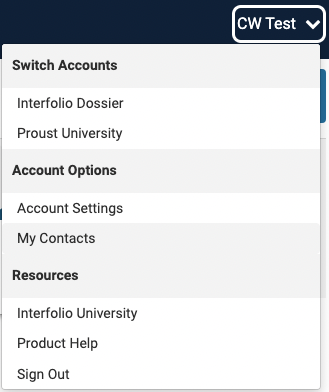
- Confirm the email address entered for your letter writer is correct. If the address is incorrect, edit it and then cancel the existing request and send a new one. If the email address is correct, resend the request from the Letters page.
Resending a request does not confirm that the letter has been submitted. Ask your letter writer to confirm that they received the new request and submitted the letter.
If the letter writer still doesn’t receive the request, they can email their confidential letter to help@interfolio.com. They should include your name and email address so Interfolio can upload the letter on your behalf.